The '<audio>' tag embeds sound in a webpage.
It provides a built-in, browser-native audio player with controls like play, pause, volume, and seek.
Purpose:
Embeds audio content (music, podcasts, sound effects) directly into HTML pages.
Core Behavior:
a. Loads and plays audio files (Eg: MP3, WAV, OGG).
b. Can show playback controls when enabled.
c. Supports multiple '<source>' elements for fallback formats.
d. Allows autoplay, looping, and preloading.
Syntax:
<audio [attributes]>
  <source src="file.ext" type="audio/format">
  fallback text for unsupported browsers.
</audio>
Opening tag: <audio>: can include attributes like controls, autoplay, loop, muted, preload.
Optional <source> elements: used to provide multiple formats for better browser support.
Fallback text: displayed if the browser cannot play audio.
Common attributes:
src: path to the audio file.
controls: displays the browser's audio UI, ie: show player
autoplay: starts playing automatically.
loop: replays when finished.
muted: starts muted.
preload: hints how much data to preload (none, metadata, auto).
type: MIME format (on <source> tag)
The type attribute tells the browser what audio format a <source> file is.
It is a MIME type. A short identifier like audio/mpeg or audio/ogg that helps the browser decide whether it can play the file before downloading it.
Common MIME Types:

MP3: audio/mpeg

OGG: audio/ogg

WAV: audio/wav

AAC (MP4 container): audio/aac or audio/mp4

FLAC: audio/flac
crossorigin — CORS for audio processing
Examples:
Eg:
// html:
<audio src="song.mp3" controls></audio>
Eg2: with multiple sources:
// html:
<audio controls>
  <source src="song.mp3" type="audio/mpeg">
  <source src="song.ogg" type="audio/ogg">
  Your browser does not support the audio element.
</audio>
Eg3:
// code:
using System;
using System.Collections.Generic;
using System.Linq;
using System.Web;
using System.Web.Mvc;

namespace AudioPlayback1.Controllers
{
    public class AudioTestController : Controller
    {
        // GET: AudioTest
        public ActionResult Index()
        {
            return View();
        }


        public ActionResult PlayLocalFile()
        {
            string filePath = @"C:\Test\Audio Recordings\file1.wav";

            if (!System.IO.File.Exists(filePath))
            {
                return HttpNotFound("Audio file not found.");
            }

            //return File(filePath, "audio/mpeg");    // mp3 file

            return File(filePath, "audio/wav");   // wav file, wav's mime type
        }
    }
}


// view: index.cshtml
@{
    Layout = null;
}

<!DOCTYPE html>

<html>
<head>
    <meta name="viewport" content="width=device-width" />
    <title>Index</title>
</head>
<body>
    <div>
        <h2>Audio Test</h2>

        <audio controls autoplay>
            @*<source src="@Url.Action("PlayLocalFile", "AudioTest")" type="audio/mpeg" />*@
            <source src="@Url.Action("PlayLocalFile", "AudioTest")" type="audio/wav" />
            Your browser does not support the audio tag.
        </audio>
    </div>
</body>
</html>
Outputs:
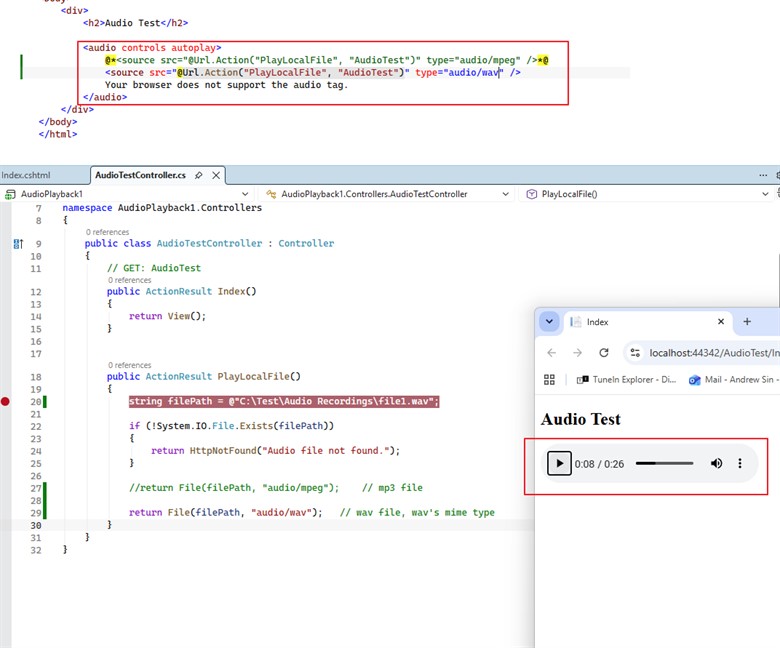
Eg4: 'controls' shows the browser's built-in audio UI (play/pause, volume, seek).
Most important attribute. Without it, users cannot interact.
<audio src="song.mp3" controls></audio>
Eg5: 'autoplay' starts playing as soon as the file loads.
Browsers often block it unless muted.
<audio src="intro.mp3" autoplay muted></audio>
Note: 'muted' starts muted. Often paired with autoplay to bypass browser restrictions.
